Script Libraries & Constants
Full reference of every library module. View Reference →
The References dialog controls which of VBA Padlock’s built-in library modules are compiled into your protected DLL. Tick ExcelConstants, for instance, and the compiler recognizes xlUp, xlCellTypeVisible, and every other xl* symbol your code uses, no magic numbers required. Open it with the References button in the Protect tab’s Project group.
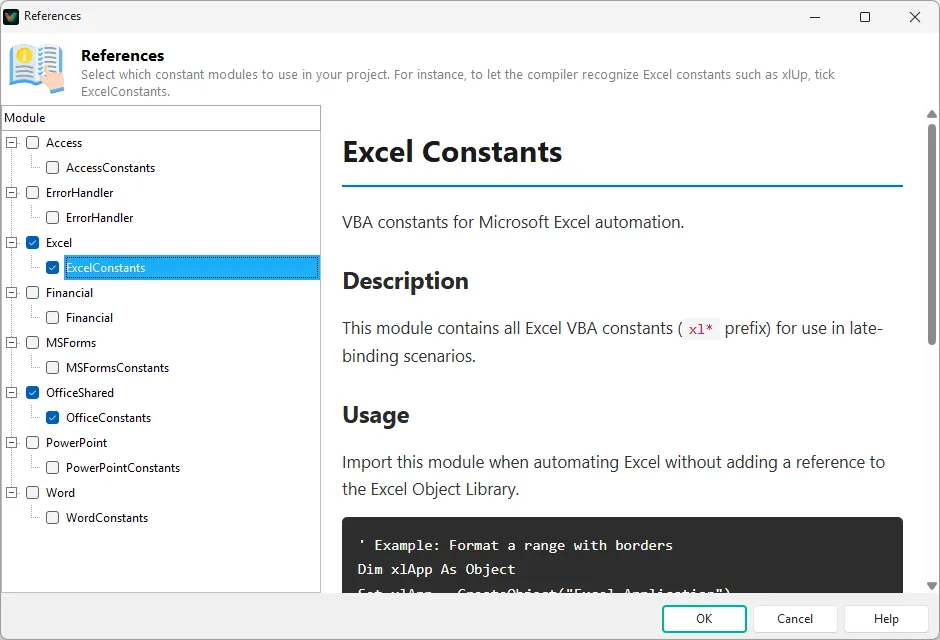
The left pane lists the available modules as a checkbox tree; select one to read its documentation in the preview pane.
| Module | Provides |
|---|---|
ExcelConstants | The xl* constants (Excel). |
WordConstants | The wd* constants (Word). |
PowerPointConstants | The pp* constants (PowerPoint). |
AccessConstants | The ac* constants (Access). |
OfficeConstants | The shared mso* constants. |
MSFormsConstants | The fm* constants (Microsoft Forms 2.0). |
Financial | Financial functions (PMT, PV, NPV, IRR, …). |
ErrorHandler | Error-handling helpers. |
Checked modules are compiled into the DLL with your code and saved with the project; unchecked ones cost nothing. If a constant doesn’t resolve at compile time, tick the missing module and run a Syntax Check.
Script Libraries & Constants
Full reference of every library module. View Reference →
Compile & Syntax Check
Validate your project after changing references. View Reference →