Smart Filtering
Quickly find specific routines in large projects by typing in the filter field.
The VBA Wrapper Generator (Protect tab → Advanced group) lets you preview and copy the typed VBA “facade” functions that call your compiled DLL. Instead of invoking protected logic through generic string-based commands, wrappers give you clean, IntelliSense-friendly calls.
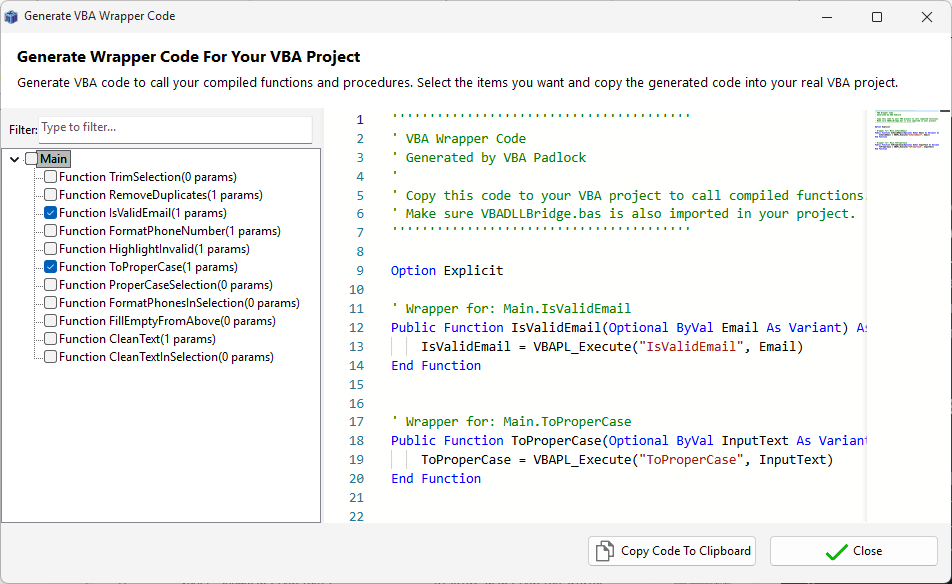
By default, the VBA Bridge exposes a generic function called VBAPL_Execute. While powerful, it lacks IntelliSense support and type safety. Wrappers solve this:
Generic call:
Result = VBAPL_Execute("Financials|CalculateTax", 5000, 0.2)With a wrapper:
' Clean, typed, and fully supported by IntelliSenseResult = CalculateTax(5000, 0.2)Smart Filtering
Quickly find specific routines in large projects by typing in the filter field.
One-Click Copy
Review the code in the built-in preview and copy it to your clipboard with a single click.
Automatic Protection
Let Produce generate and inject the wrappers automatically. Read the feature guide →
VBA Bridge
The engine behind the wrappers. View Reference →
Code Editor
Define your public functions. View Reference →