Automatic Protection
The full workflow this review belongs to. Read the feature guide →
The Protection Review is where you read (and adjust) the result of VBA Padlock’s automatic analysis. Every module and every procedure of your Office file appears in a verdict tree with a clear disposition: it either moves into the protected DLL or stays in VBA, always with the reason spelled out. Open it with View Report in the Protect tab, or let it appear automatically after an analysis.
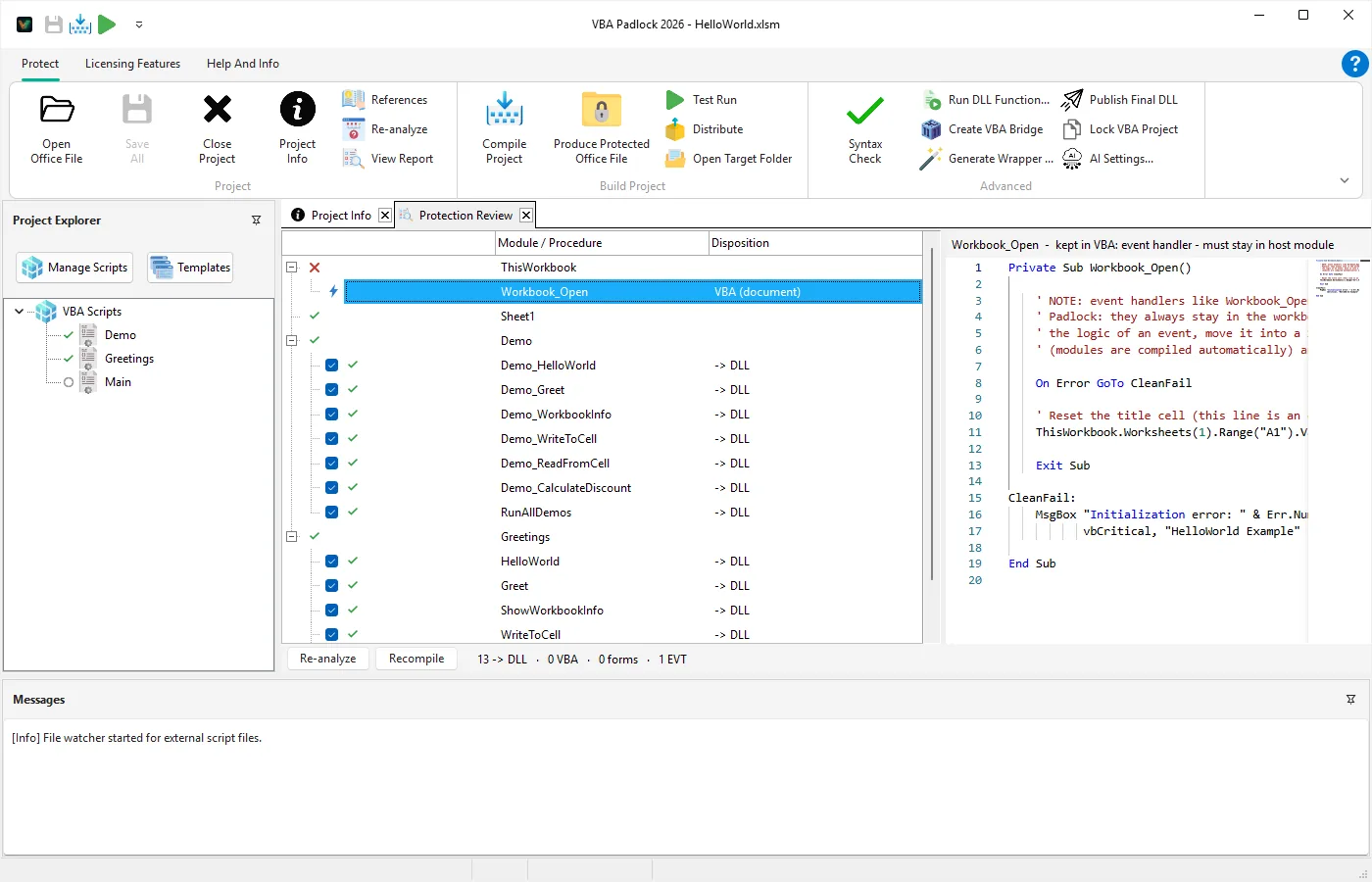
The review is split into two panes:
Name (Get), Name (Let), or Name (Set).A footer keeps the running total, e.g. 12 -> DLL · 4 VBA · 2 forms · 3 EVT.
| Disposition | Meaning |
|---|---|
-> DLL | The procedure compiles into the protected DLL; a delegating wrapper replaces it in the document. |
VBA | The procedure stays in the document (reason shown on the row). |
VBA (document) | Code in ThisWorkbook, Sheet1, and other document modules: always stays in the Office file. |
VBA (form) | UserForm code-behind: always stays in the Office file. |
| Verdict | Meaning |
|---|---|
| Pass | Every eligible procedure in the module moves to the DLL. |
| Partial | Some procedures stay in VBA; check the per-row reasons. |
| Fail | The module does not compile; the compiler message is shown as the reason. |
A module that has never been analyzed shows “Not analyzed yet - run Re-analyze.”
| Reason shown | What it means |
|---|---|
event handler - must stay in host module | Office fires events only on host-module code. |
UserForm modules cannot run in a DLL | Forms stay in the document, always. |
shared module-level state '<name>' | The procedure reads/writes a module-level variable; moving it would split state between host and DLL. |
depends on <proc> | The procedure calls something that stays in VBA, so it is demoted with it. |
References host object <X> which the protected DLL cannot resolve - kept in VBA. | An unqualified host global in a module without Option Explicit. Adding Option Explicit or qualifying with Application. usually fixes this. |
already protected - kept in VBA | The file already contains produced wrappers: you are looking at an output file, not a source. |
bridge function - must stay in VBA | The VBAPLBridge module itself is infrastructure and never compiles into the DLL. |
Each procedure row carries an override checkbox. Untick a -> DLL procedure to keep it in VBA (useful when you want a routine to remain user-editable or debuggable).
If nothing is left to move, Produce warns you with “Nothing will be protected” before writing a plain, unprotected copy.
Option Explicit, restructure shared state) and hit Re-analyze.Automatic Protection
The full workflow this review belongs to. Read the feature guide →
Produce & Test Run
Turn the plan into a protected file. View Reference →
Code Editor
See the same verdicts as gutter markers while editing. View Reference →
VBA Compatibility
Language support and gate rules in detail. View Reference →