Hot Reloading
While iterating, you don’t need to close Excel! Compile Project (F5) rebuilds the satellite DLLs in place; switch back to your workbook and run your macro again to see the changes instantly.
This guide takes you from a standard macro-enabled Office file to a protected, compiled copy in four steps. You don’t rewrite anything: VBA Padlock analyzes the code you already have and does the conversion for you.
Everything in VBA Padlock follows this sequence:
.xlsm, .docm, .pptm, or .accdb file. Your VBA is analyzed automatically.Launch & Open: Open VBA Padlock and click Open Office File (Ctrl+O). Select your macro-enabled file.
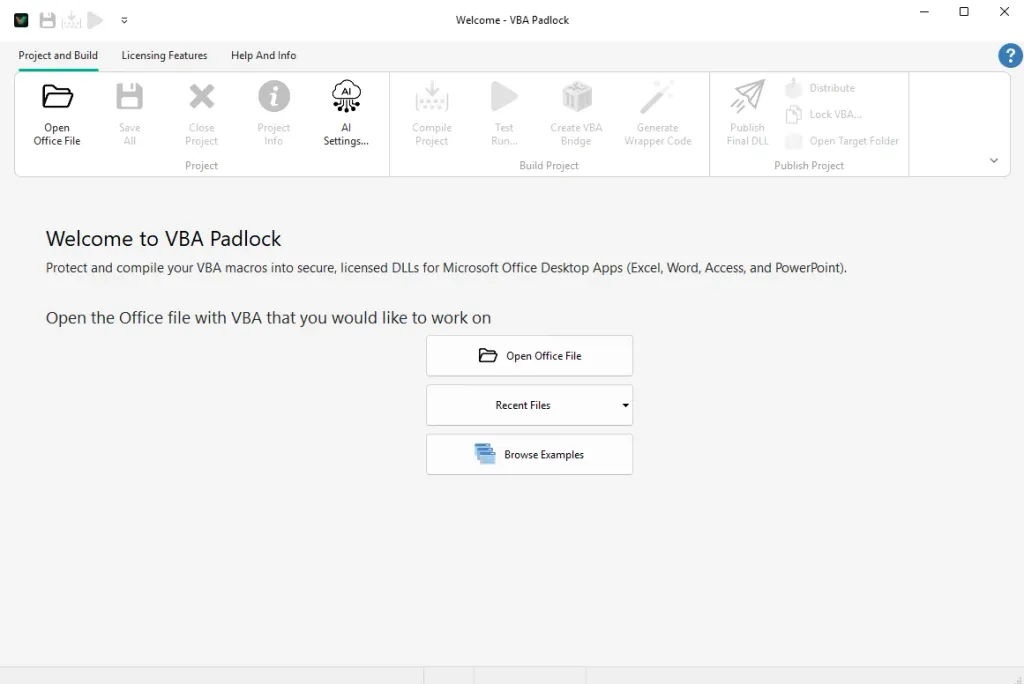
The first time a file is opened, VBA Padlock reads its VBA modules (macros stay disabled during the read) and analyzes them automatically.
Review the Analysis:
The Protection Review lists every module and procedure with a verdict: -> DLL for code that will be compiled and protected, VBA for code that stays in the document. Event handlers, UserForms, and document modules stay in VBA by design; the review tells you why, row by row.
You rarely need to change anything here, but per-procedure checkboxes let you keep any routine in plain VBA if you want to.
Produce (or Test Run):
Click Produce Protected Office File, or go straight to Test Run (Ctrl+F5), which produces the file and opens it in Office. The pipeline compiles your procedures into the DLL, generates the delegating wrappers and the VBAPLBridge module, and injects them into the protected copy.
See the Difference: In the protected copy, your macros and buttons work exactly as before. But open the VBA editor (Alt+F11): the protected modules no longer contain your code, only thin wrappers that call the compiled DLL.
Hot Reloading
While iterating, you don’t need to close Excel! Compile Project (F5) rebuilds the satellite DLLs in place; switch back to your workbook and run your macro again to see the changes instantly.
After producing, your folder contains the protected copy and a bin/ directory with its DLLs. Ship those two, and keep the original source file for yourself.
The Distribution tool packages the right files into a ZIP or folder for you, so you can’t accidentally ship the unprotected source.
Automatic Protection
How the analysis, review, and conversion actually work. Read the feature guide →
Excel Tutorial
A deep dive into protecting an Excel workbook, start to finish. Read the guide →
Licensing Setup
Add trial periods, activation keys, and hardware locking. Configure licensing →
Compatibility
Check which VBA constructs move to the DLL and which stay in the host. Check compatibility →