Master Key
A secret random value that is the “DNA” of your project’s licensing. The Master Key is required for both Short and Long key formats. It is the foundation of all license generation. Keep it safe and never change it after release.
The Advanced Activation workspace is for developers who need specialized control over their software’s security handshake. This is where you configure the cryptographic engines that power your activation keys and define how your application behaves when no valid license is present. For an in-depth look at the security architecture, see the Security Feature guide.
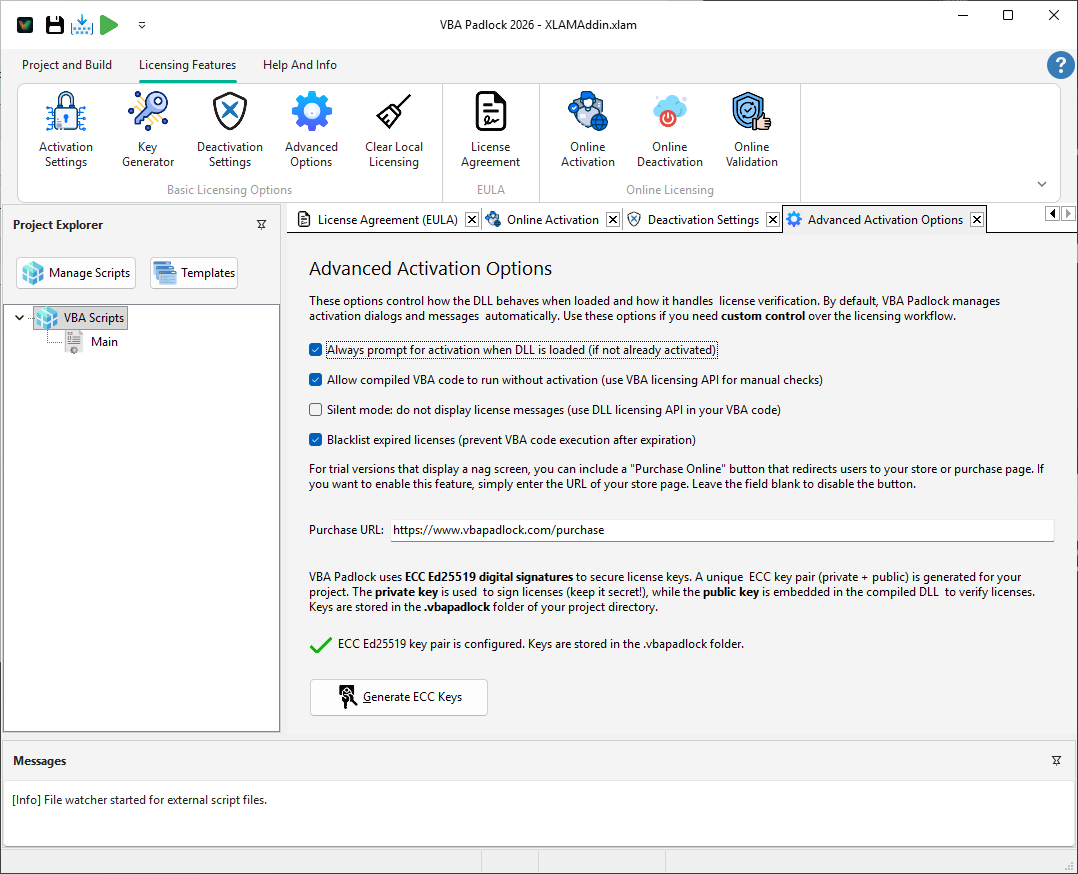
Control the gravity of your security enforcement. Choose between a mandatory gatekeeper or a silent background monitor:
VBA Padlock Studio leverages industry-standard algorithms to ensure your licenses cannot be forged or tampered with.
Master Key
A secret random value that is the “DNA” of your project’s licensing. The Master Key is required for both Short and Long key formats. It is the foundation of all license generation. Keep it safe and never change it after release.
Ed25519 ECC Keys
Modern Elliptic Curve Cryptography used additionally for Long (ECC) keys. Generate a unique key pair to digitally sign your licenses with strong cryptographic security. Only required if you use the Long key format.
Drive revenue by making it easy for trial users to upgrade to a full license:
Key Generator
Create keys using these settings. View Reference →
Activation UI
Configure the user-facing dialog. View Reference →