Hardware Locked
- Maximum Security: Keys cannot be shared.
- Usage: Standard desktop installs.
- Storage: Windows Registry.
Prevent software piracy and unauthorized license sharing by binding your application to a specific machine. Hardware locking ensures that a license key generated for one user cannot be used on a different computer.
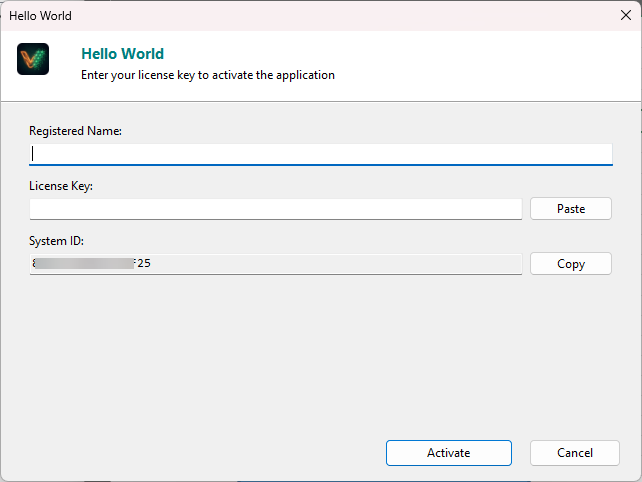
The process creates a unique “fingerprint” of the user’s computer, known as the Hardware ID (or System ID).
You have full control over which hardware parts form the “fingerprint”. You can configure these in the Hardware ID Options dialog.
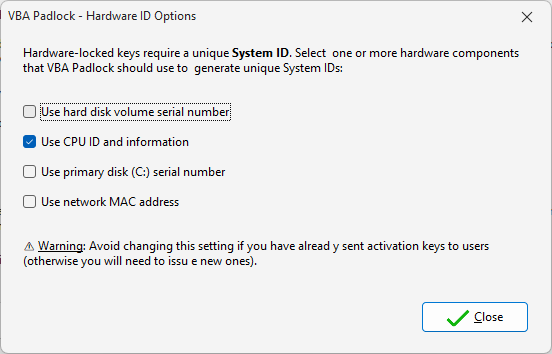
| Component | Reliability | Stability | Recommended? |
|---|---|---|---|
| CPU Info | High | Very Stable | Yes (Default) |
| HD Serial | High | Stable | Yes (Default) |
| MAC Address | Moderate | Variable | Only for stable networks |
| Primary Disk | High | Subject to upgrades | Optional |
There are several ways to get the Hardware ID from your users.
The standard activation dialog displays the Hardware ID prominently. Users can simply copy and paste it into an email or your web store.
You can create a “Get My ID” button in your Excel/Word ribbon:
Public Sub ShowHardwareID() Dim hwid As String hwid = VBAPL_GetHardwareID() MsgBox "Your System ID is: " & hwidEnd SubIf you use Online Activation, the Hardware ID is sent silently to your server. The system then generates and delivers the locked key automatically.
Sometimes, hardware locking is too restrictive (e.g., users working from multiple computers via USB).
Hardware Locked
Portable Mode (.LIC)
.LIC file next to workbook.Hardware Options
Configure the components used for the ID fingerprint. View reference →
Key Generator
Generate keys locked to specific Hardware IDs. Learn how →
Deactivation
Allow users to transfer their license to a new machine. Learn more →