Display Trial Info
' Office VBA sideIf VBAPL_IsTrialMode() Then Dim daysLeft As Long daysLeft = VBAPL_GetTrialLimitLeft() MsgBox daysLeft & " days left in trial."End IfLower the barrier to entry for your potential customers by offering a Trial Version of your software. VBA Padlock allows you to distribute your application with built-in evaluation limits that automatically prompt for purchase once the trial expires.
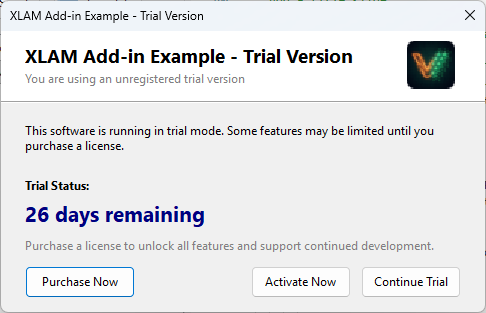
Select the evaluation model that best fits your application’s use case:
The application runs for a fixed number of days starting from the first launch.
The application works for a specific number of launches (e.g., 50 runs).
The application works until a specific calendar date (e.g., the end of the year).
The Nag Screen is an optional reminder dialog shown at every launch when a Trial Key is active. It encourages users to convert by providing direct buttons for purchase and activation. Without a key, even if evaluation is allowed, the Nag Screen will not be displayed automatically.
In Advanced Activation Options, you can fine-tune the trial behavior:
| Mode | Behavior |
|---|---|
| Always Prompt | Shows the activation dialog on every launch. |
| Nag Screen | Shows a friendly reminder with a “Continue Trial” button. |
| Silent Mode | No dialog is shown. You must check the status via VBA code. |
Use the VBA Bridge to customize the behavior of your application based on the trial status.
Display Trial Info
' Office VBA sideIf VBAPL_IsTrialMode() Then Dim daysLeft As Long daysLeft = VBAPL_GetTrialLimitLeft() MsgBox daysLeft & " days left in trial."End IfCheck in DLL
' Inside compiled codeIf IsTrialMode() Then ' Disable "Premium" featuresEnd IfMost professional developers follow this sequence for distributing trials:
Key Generator
Configure trial limits and generate evaluation keys. View reference →
Localization
Translate trial countdowns and nag screen labels. Learn how →
Licensing System
Understand the difference between trial and full licenses. View overview →