Script Functions Reference
When you write VBA code inside VBA Padlock’s code editor (the scripts that get compiled into the DLL), you have access to a set of built-in functions beyond standard VBA.
The Builtin Catalog
Section titled “The Builtin Catalog”Compiled code has access to 80+ global builtins mirroring standard VBA, plus built-in objects:
| Category | Functions |
|---|---|
| Strings | Asc, AscW, Chr, ChrW, Format, FormatCurrency, FormatDateTime, FormatNumber, FormatPercent, Hex, InStr, InStrRev, Join, LCase, Left, Len, LTrim, Mid, Replace, Right, RTrim, Space, Split, StrComp, StrConv, String, StrReverse, Trim, UCase, Oct |
| Math | Abs, Atn, Cos, Exp, Fix, Int, Log, Rnd, Randomize, Round, Sgn, Sin, Sqr, Str, Tan, Val |
| Date/Time | Now, Date, Time, Timer, DateAdd, DateDiff, DatePart, DateSerial, DateValue, TimeSerial, TimeValue, Day, Hour, Minute, Month, MonthName, Second, Weekday, WeekdayName, Year |
| Conversion | CBool, CByte, CCur, CDate, CDbl, CDec, CInt, CLng, CLngLng, CSng, CStr, CVErr |
| Type checks | IsArray, IsDate, IsEmpty, IsError, IsMissing, IsNull, IsNumeric, IsObject, TypeName, VarType |
| Flow & misc | IIf, Choose, Switch, CallByName, Array, LBound, UBound, ReDim/ReDim Preserve, DoEvents, RGB, Nz, InputBox, MsgBox, CreateObject, GetObject |
Built-in objects: the Err object (Number, Description, Clear, Raise), Debug.Print, and Collection (New Collection with Add, Item, Remove, Count, string keys, For Each).
Also available:
- File I/O:
AssignFile,Reset,Rewrite,Append,CloseFile,Write,WriteLn,ReadLn,EOF,FilePos,FileSize. - Extended math & financial library: 80+ additional functions:
Power,RoundTo, hyperbolic/trigonometric variants, and financial helpers (Payment,PresentValue, depreciation, …). For VBA-style financial functions (PMT,PV,FV,NPV,IRR, …), tick the Financial module in References.
The sections below document the most commonly used functions in detail.
Extension Library
Section titled “Extension Library”The extension library provides VBA-compatible functions that work inside compiled scripts. These mirror standard VBA functions so you can write natural VBA code.
String Functions
Section titled “String Functions”All string functions support the VBA $ suffix variants (e.g., Mid$, Left$, Trim$) which return String instead of Variant.
Function Mid(S As String, Start As Integer, Optional Length As Integer) As StringReturns a substring starting at Start (1-based).
Left / Right
Section titled “Left / Right”Function Left(S As String, Length As Integer) As StringFunction Right(S As String, Length As Integer) As StringReturns the leftmost or rightmost Length characters of a string.
Function Len(S As String) As IntegerReturns the number of characters in a string.
InStr / InStrRev
Section titled “InStr / InStrRev”Function InStr(Start As Integer, String1 As String, String2 As String, Optional Compare As Integer = vbBinaryCompare) As IntegerFunction InStrRev(StringCheck As String, StringMatch As String, Optional Start As Integer = -1, Optional Compare As Integer = vbBinaryCompare) As IntegerReturns the position of the first (or last) occurrence of a substring. Returns 0 if not found.
Replace
Section titled “Replace”Function Replace(Expression As String, Find As String, ReplaceWith As String, Optional Start As Integer = 1, Optional Count As Integer = -1, Optional Compare As Integer = vbBinaryCompare) As StringReplaces occurrences of a substring within a string. Set Count to limit the number of replacements.
Trim, LTrim, RTrim
Section titled “Trim, LTrim, RTrim”Function Trim(S As String) As StringFunction LTrim(S As String) As StringFunction RTrim(S As String) As StringRemoves leading and/or trailing spaces from a string. LTrim removes leading spaces only, RTrim trailing spaces only.
UCase, LCase
Section titled “UCase, LCase”Function UCase(S As String) As StringFunction LCase(S As String) As StringConverts a string to uppercase or lowercase.
Split / Join
Section titled “Split / Join”Function Split(Expression As String, Optional Delimiter As String = " ", Optional Limit As Integer = -1, Optional Compare As Integer = vbBinaryCompare) As VariantFunction Join(SourceArray As Variant, Optional Delimiter As String = " ") As StringSplit breaks a string into an array of substrings using a delimiter. Join concatenates an array of strings into a single string.
result = expression Like patternVBA comparison operator for pattern matching. Returns True if expression matches pattern.
Wildcards: ? (any single character), * (zero or more characters), # (any single digit), [charlist] (any character in the list), [!charlist] (any character not in the list).
If myString Like "*Lid*" Then ' contains "Lid"If name Like "A*" Then ' starts with "A"If code Like "##-###" Then ' matches digit patternFormat
Section titled “Format”Function Format(Expression As Variant, Optional FormatStr As String = "") As StringFormats a number, date, or string according to a format specifier (e.g., "#,##0.00", "yyyy-mm-dd").
Numeric Functions
Section titled “Numeric Functions”| Function | Signature | Description |
|---|---|---|
Abs | Abs(X) As Double | Absolute value |
Sqr | Sqr(X) As Double | Square root |
Sin, Cos, Tan | Trigonometric functions | Sine, Cosine, Tangent (radians) |
Exp | Exp(X) As Double | Exponential (e^X) |
Round | Round(X, Optional Digits = 0) As Double | Arithmetic rounding |
Val | Val(S As String) As Double | Parse string to number |
Str | Str(X) As String | Number to string |
Date/Time Functions
Section titled “Date/Time Functions”Now / Date / Time
Section titled “Now / Date / Time”Function Now() As DoubleFunction Date() As DoubleFunction Time() As DoubleNow returns the current date and time. Date returns the date portion only. Time returns the time portion only. All values are VBA Date-compatible doubles.
DateAdd / DateDiff
Section titled “DateAdd / DateDiff”Function DateAdd(Interval As String, Number As Integer, DateValue As Double) As DoubleFunction DateDiff(Interval As String, Date1 As Double, Date2 As Double, ...) As LongLongDateAdd adds a time interval to a date (e.g., DateAdd("m", 3, Now()) adds 3 months). DateDiff returns the number of intervals between two dates. Supported intervals: "yyyy" (year), "q" (quarter), "m" (month), "d" (day), "h" (hour), "n" (minute), "s" (second).
Control Flow
Section titled “Control Flow”IIf / Choose / Switch
Section titled “IIf / Choose / Switch”Function IIf(Expression As Boolean, TruePart As Variant, FalsePart As Variant) As VariantFunction Choose(Index As Integer, Choice1, ...) As VariantFunction Switch(Expr1, Value1, ...) As VariantInline conditional functions. IIf returns one of two values based on a condition. Choose returns a value from a list based on an index. Switch evaluates expression/value pairs and returns the value for the first True expression.
Array & Utility
Section titled “Array & Utility”| Function | Signature | Description |
|---|---|---|
Array | Array(args...) As Variant | Creates a 0-based array |
DoEvents | DoEvents() As Integer | Processes pending Windows messages |
TypeName | TypeName(V) As String | Returns the type name of a variable |
VarType | VarType(V) As Integer | Returns the type code of a variable |
Nz | Nz(Value, Optional Default = 0) As Variant | Returns Default if Value is Null or Empty |
RGB | RGB(Red, Green, Blue) As Integer | Creates a color value |
License Library
Section titled “License Library”These functions let your compiled scripts interact with the licensing system at runtime.
License Status
Section titled “License Status”IsLicenseValid
Section titled “IsLicenseValid”Function IsLicenseValid() As BooleanReturns True if the current license is valid or if activation is not required.
IsTrialMode
Section titled “IsTrialMode”Function IsTrialMode() As BooleanReturns True if the application is currently running in trial mode.
HasStoredLicense
Section titled “HasStoredLicense”Function HasStoredLicense() As BooleanReturns True if a license key is stored on this computer.
GetTrialDaysLeft
Section titled “GetTrialDaysLeft”Function GetTrialDaysLeft() As IntegerReturns the remaining trial allowance. Returns -1 if not in trial mode.
GetTrialLimitType
Section titled “GetTrialLimitType”Function GetTrialLimitType() As IntegerReturns the type of trial limit configured for this project.
| Return | Meaning |
|---|---|
0 | Days (tltDays) |
1 | Runs (tltRuns) |
2 | Expiration date (tltExpiration) |
-1 | Not in trial mode |
GetRegisteredName
Section titled “GetRegisteredName”Function GetRegisteredName() As StringReturns the licensee name, or an empty string if no license is stored.
GetHardwareID
Section titled “GetHardwareID”Function GetHardwareID() As StringReturns the Hardware ID string for the current machine.
License Properties
Section titled “License Properties”GetLicenseProperty
Section titled “GetLicenseProperty”Function GetLicenseProperty(PropertyName As String, Optional DefaultValue As Variant = "") As VariantReturns a project or license property by name.
| Property Name | Description |
|---|---|
registeredname | Licensee name |
licensekey | Stored license key |
apptitle | Application title |
projectguid | Project unique identifier |
purchaseurl | Purchase URL (configured in VBA Padlock Studio) |
Example:
Dim title As Stringtitle = GetLicenseProperty("apptitle", "My App")Dialogs & UI
Section titled “Dialogs & UI”VBA Padlock provides built-in dialogs that you can trigger directly from your scripts.
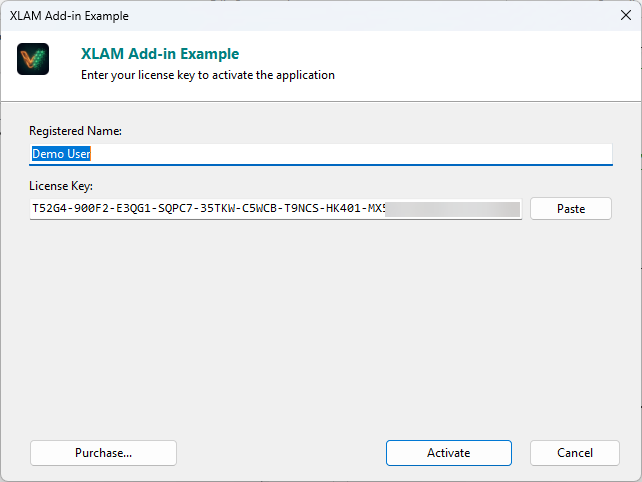
ShowActivationDialog
Section titled “ShowActivationDialog”Function ShowActivationDialog(Optional ForceDisplay As Boolean = False) As IntegerDisplays the activation dialog. Returns 1 on success, 0 on cancel.
ShowTrialNag
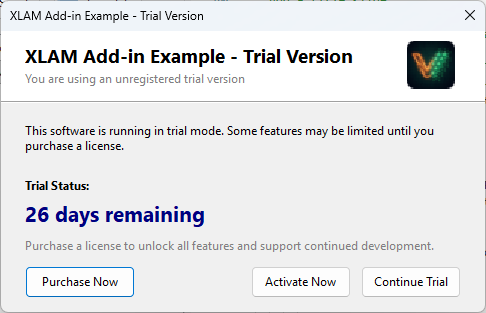
Section titled “ShowTrialNag”Function ShowTrialNag(Optional ForceDisplay As Boolean = False) As IntegerShows the trial nag screen. Returns 0 (continue), 1 (activate), or 2 (purchase).
ShowDeactivateDialog
Section titled “ShowDeactivateDialog”Function ShowDeactivateDialog() As IntegerShows the deactivation dialog. Returns 0 on success, 1 on cancel.
ShowEULA
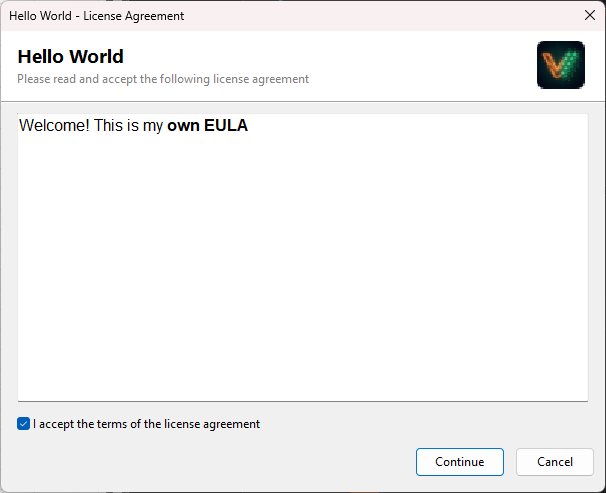
Section titled “ShowEULA”Function ShowEULA(Optional ForceDisplay As Boolean = False) As IntegerDisplays the EULA dialog. Returns 1 (accepted), 0 (declined).
IsEulaAccepted
Section titled “IsEulaAccepted”Function IsEulaAccepted() As BooleanReturns True if the EULA has been accepted or if no EULA is configured.
GetEulaAcceptanceDate
Section titled “GetEulaAcceptanceDate”Function GetEulaAcceptanceDate() As DoubleReturns the EULA acceptance date as a TDateTime value (VBA Date compatible). Returns 0 if not accepted.
Online Validation
Section titled “Online Validation”ValidateOnline
Section titled “ValidateOnline”Function ValidateOnline(Optional Silent As Boolean = True) As IntegerPerforms online license validation against the activation server.
| Return | Meaning |
|---|---|
1 | Validation successful |
0 | Failed or license revoked |
-1 | Not initialized |
-2 | Online validation not configured |
-3 | No license stored |
-4 | Network error |
-5 | Server error |
-6 | Security validation failed |
Example:
Dim result As Integerresult = ValidateOnline(False) ' Show errors to user
If result = 0 Then    MsgBox "Your license has been revoked.", vbCriticalEnd If
IsValidationRequired
Section titled “IsValidationRequired”Function IsValidationRequired() As IntegerReturns 1 if an online validation check is due, 0 if not yet required.
Locale Library
Section titled “Locale Library”These functions provide localization support for your compiled scripts. You can load custom translations from JSON files and use them in your code.
Implementation Steps
Section titled “Implementation Steps”- Prepare a JSON file with your translations (e.g.,
{"welcome_message": "Bienvenue"}). - Load the locale in your script using
LoadLocale(jsonContent). - Retrieve strings anywhere using
L("key").
Functions Reference
Section titled “Functions Reference”Function L(Key As String) As StringReturns the localized string for the given key. If the key is not found, returns the key itself.
Example:
MsgBox L("welcome_message")Function LFmt(Key As String, Args As Variant) As StringReturns a formatted localized string with placeholder substitution (up to 5 arguments).
Example:
' If the locale defines: "greeting" = "Hello, %s! You have %d messages."Dim msg As Stringmsg = LFmt("greeting", Array("John", 5))' Result: "Hello, John! You have 5 messages."LPlural
Section titled “LPlural”Function LPlural(Key As String, Count As Integer) As StringReturns the appropriate plural form of a localized string based on the count.
LoadLocale
Section titled “LoadLocale”Function LoadLocale(JSONContent As String) As BooleanLoads localization strings from a JSON string. Returns True on success.
GetCurrentLocale
Section titled “GetCurrentLocale”Function GetCurrentLocale() As StringReturns the current locale code (e.g., "en", "fr"), or an empty string if no locale is loaded.
IsLocaleLoaded
Section titled “IsLocaleLoaded”Function IsLocaleLoaded() As BooleanReturns True if a custom locale has been loaded.
HasLocaleKey
Section titled “HasLocaleKey”Function HasLocaleKey(Key As String) As BooleanReturns True if the given key exists in the current locale.
SetLocaleString
Section titled “SetLocaleString”Function SetLocaleString(Key As String, Value As String) As BooleanAdds or overrides a single locale string. Returns True on success.
Constants
Section titled “Constants”| Constant | Value | Description |
|---|---|---|
vbUpperCase | 1 | Convert to uppercase |
vbLowerCase | 2 | Convert to lowercase |
vbProperCase | 3 | Capitalize first letter of each word |
vbUnicode | 64 | Convert to Unicode |
vbFromUnicode | 128 | Convert from Unicode |
| Constant | Value |
|---|---|
vbSunday | 1 |
vbMonday | 2 |
vbTuesday | 3 |
vbWednesday | 4 |
vbThursday | 5 |
vbFriday | 6 |
vbSaturday | 7 |
| Constant | Description |
|---|---|
vbEmpty | Uninitialized |
vbNull | Null |
vbInteger | Integer |
vbLong | Long integer |
vbString | String |
vbObject | Object |
vbBoolean | Boolean |
vbArray | Array |
| Constant | Value | Description |
|---|---|---|
vbCrLf | Chr(13) & Chr(10) | Carriage return + line feed |
vbTab | Chr(9) | Tab |
vbNullString | "" | Empty string |
See Also
Section titled “See Also”- Script Libraries & Constants: Office constants and utility modules for compiled scripts
- VBA Bridge API Reference: Functions for calling the DLL from Office VBA
- VBA Compatibility: Supported VBA features and limitations