Advanced Copy Protection
Eliminate source code from Office files so it cannot be copied or reverse engineered.
Overview
Shield your VBA code, proprietary formulas, and business logic from prying eyes. VBA Padlock eliminates the original source code entirely - it is replaced by compiled bytecode inside signed DLLs that cannot be decompiled, reverse engineered, or copied.
Key Benefits
- Original VBA source code is physically removed from the Office file
- Proprietary formulas and algorithms exist only as compiled bytecode in the DLL
- Runtime DLLs Authenticode-signed by G.D.G. Software, reducing unknown-publisher warnings
- Internal integrity checks detect any tampering attempt
- Lock VBA Project hides even the Bridge module from the VBA Editor
Why VBA Passwords and Obfuscation Fail
Standard VBA project passwords are stored as a simple hash inside the Office file. Free tools remove them in seconds. Obfuscation only renames variables - the algorithm logic remains readable. Neither approach removes your source code from the file.
Protection level
None
VBA Password
- • Source code fully visible after bypass
- • Removed in seconds with free tools
- • Not encryption - just a flag
Protection level
Low
Obfuscation
- • Code still in VBA Editor (garbled names)
- • Algorithm structure remains visible
- • Tools can reverse-engineer logic
Protection level
High
DLL Compilation
- • Source code eliminated from file
- • Bytecode cannot be decompiled
- • Signed DLLs with integrity checks
Multi-Layer Protection
VBA Padlock does not rely on a single mechanism. Four independent layers work together to keep your code safe.
Source code elimination
Your procedures are compiled into bytecode and the protected copy of your Office file ships without them, leaving only wrappers, forms, and document modules that carry no logic of yours. Your original file is never modified.
Signed runtime DLLs
Both 32-bit and 64-bit runtime DLLs are Authenticode-signed by G.D.G. Software, so Windows names the publisher instead of showing Unknown Publisher.
Integrity verification
Every satellite DLL carries an internal cryptographic signature. If even one byte is modified, the runtime refuses to load it.
DLL binding
Each Office file is bound to its DLL through a unique Security Code. The DLL only activates when the correct project-specific identifier is provided.
What Happens to Your Code
Before protection, anyone opening the VBA Editor sees your full source code - every formula, every algorithm, every business rule. In the protected copy, the VBA Editor shows only the generated wrappers and the VBA bridge. Your intellectual property lives inside the compiled DLL.
Before - source code exposed
Public Function CalculateDiscount(price As Double) As Double
    ' Proprietary pricing formula
    If price > 1000 Then
        CalculateDiscount = price * 0.85
    ElseIf price > 500 Then
        CalculateDiscount = price * 0.92
    Else
        CalculateDiscount = price * 0.97
    End If
End Function
After - only the delegating wrapper remains
Public Function CalculateDiscount(price As Double) As Double
    CalculateDiscount = VBAPL_Execute("CalculateDiscount", price)
End Function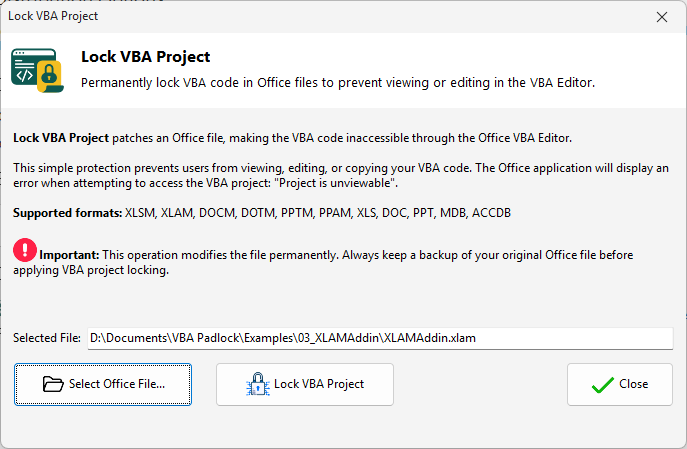
Extra layer: Lock VBA Project
Apply a specialized lock that makes the VBA Editor show "Project is unviewable" - more reliable than the standard Excel VBA password.
Threat Mitigation
| Threat | Without VBA Padlock | With VBA Padlock |
|---|---|---|
| Someone opens the VBA Editor | Full source code visible - copy and paste in seconds | Only the generated wrappers and the VBA bridge remain visible; business logic is gone |
| Password cracker tools | Password removed in seconds with free tools | No password to crack - source code does not exist in the file |
| VBA decompiler / deobfuscator | Obfuscated code reversed to readable form | Bytecode cannot be decompiled back to VBA source |
| File shared without permission | Recipient has full access to all code and formulas | Code locked inside DLLs; add Hardware Locking to tie to one machine |
| DLL tampered by attacker | N/A | Internal integrity checks detect modification; runtime refuses to load |
Protect Formulas and Business Logic
Keep proprietary calculations out of worksheet cells: write them as standard-module procedures, and VBA Padlock moves those into the compiled DLL automatically. The formulas disappear from the workbook entirely - end users get results without ever seeing how they are computed.
Proprietary calculation formulas
Write pricing models, financial algorithms, or engineering formulas as standard-module VBA functions - VBA Padlock compiles them into the DLL automatically, and they disappear from the workbook entirely.
Data processing logic
ETL routines, data cleaning scripts, and report generators run from compiled DLLs. Recipients use the workbook but cannot inspect or copy the logic.
Commercial add-ins and templates
Distribute .xlam or .xlsm files with full functionality while keeping your intellectual property sealed inside signed DLLs.
Consulting deliverables
Deliver working tools to clients while retaining ownership of the underlying code. No risk of clients forwarding your source to competitors.
Learn More
What Is a VBA Compiler?
Why you need a VBA compiler and how it works.
Security documentation
Multi-layer architecture and threat model.
Lock VBA Project
Hide the wrappers and bridge from the VBA Editor.
Excel tutorial
End-to-end protection walkthrough.
Compilation deep dive
How bytecode replaces your VBA source.
Ready to Monetize Your VBA Projects?
Download VBA Padlock and start selling protected Office solutions. One-time purchase, no royalties, no subscription.