You’ve spent weeks - maybe months - building a VBA application. Financial models, data automation, custom worksheet functions. You set a VBA project password before distributing it. You feel safe.
You shouldn’t.
VBA password protection is not encryption. It’s an access control flag stored inside the Office file. And it can be removed in under a minute, by anyone, with freely available tools.
This article explains exactly why VBA passwords fail, what happens when someone bypasses yours, and what you should do instead to protect your intellectual property.
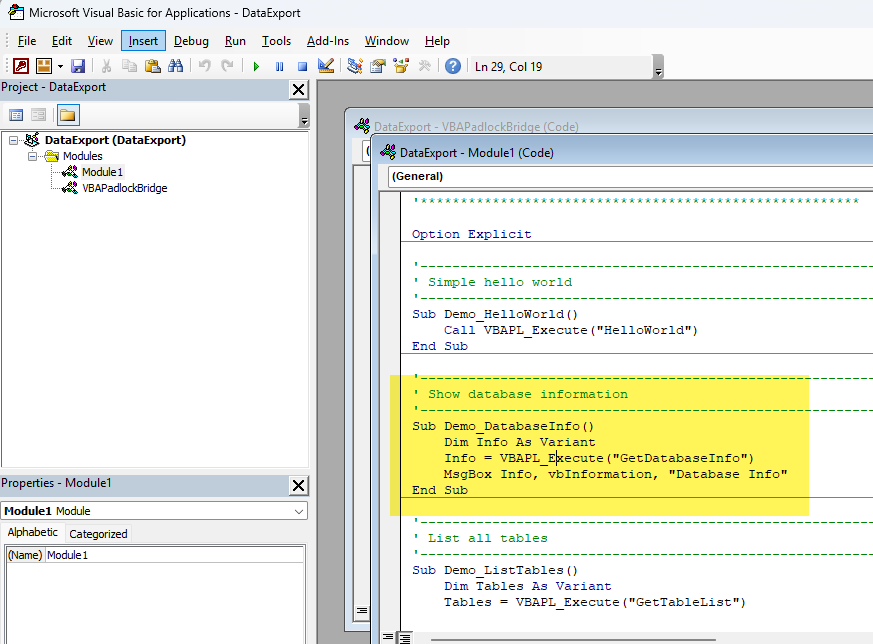
With classic protection, VBA code remains accessible and readable in the editor.
How VBA Password Protection Actually Works
When you set a password on a VBA project in the Visual Basic Editor, Microsoft Office does not encrypt your source code. Instead, it stores a hash of the password in the file’s binary OLE compound document stream. The VBA source code itself remains stored in plain form, inside the same file.
When someone tries to view the code, the VBA Editor checks the hash against the entered password. If it matches, the code is displayed. If it doesn’t, access is denied.
Here’s the critical point: the check happens entirely on the client side, inside the Office application. The file contains everything needed to read the code - the password is just a gate that can be opened or removed without touching the VBA data at all.
This is fundamentally different from encryption. With encryption, the data itself is transformed and unreadable without the key. With VBA password protection, the data is always readable - the editor just chooses not to show it.
Three Ways to Bypass a VBA Project Password
These are not theoretical vulnerabilities. They are well-documented, publicly available methods that require no specialized skill.
1. Hex Editing
The password hash is stored at a known offset in the file’s binary stream. Replacing a few specific bytes with a known value (the hash of an empty string) resets the password to blank. This works on .xlsm, .docm, .accdb, and every other VBA-enabled Office format.
Any hex editor will do. The process takes less than a minute.
2. Free Removal Tools
Multiple free, open-source tools automate the entire process. They parse the OLE compound document, locate the password hash, and strip it. Some run as command-line utilities; others have graphical interfaces. No technical knowledge is required from the user.
A simple web search for “remove VBA password” returns dozens of such tools, most with step-by-step instructions.
3. Third-Party Applications
Some Office-compatible applications (such as certain open-source spreadsheet editors) can open VBA-protected files and expose the code directly. They simply don’t enforce the protection flag. The user opens the file, navigates to the macro editor, and reads the full source code.
What Happens After Bypass
Once the password is removed or bypassed, your VBA code is fully exposed:
- Every function, every variable, every algorithm is visible in the VBA Editor
- Code can be copied - someone can extract your macros and paste them into their own project
- Code can be modified - a user could strip licensing checks, change branding, or alter calculation logic
- Code can be redistributed - there is no mechanism to prevent your code from being shared with others
If your VBA project contains proprietary business logic - pricing algorithms, financial models, custom calculation engines - password protection offers no real barrier.
Why Obfuscation Doesn’t Solve It Either
A common next step is VBA code obfuscation: tools that rename variables, insert junk code, and encode strings. The idea is to make the code harder to read even after the password is removed.
The problem? Obfuscated VBA is still valid VBA source code. It runs in the VBA Editor just like the original. The algorithm structure - loops, conditionals, COM object calls - remains intact. An experienced developer can trace the logic and reconstruct meaningful names in a matter of hours.
Obfuscation raises the effort, but it doesn’t change the fundamental vulnerability: the source code is present in the file and accessible through the VBA Editor.
The Alternative: Compile VBA to DLL
The only way to truly remove VBA source code from a distributed file is to not distribute it.
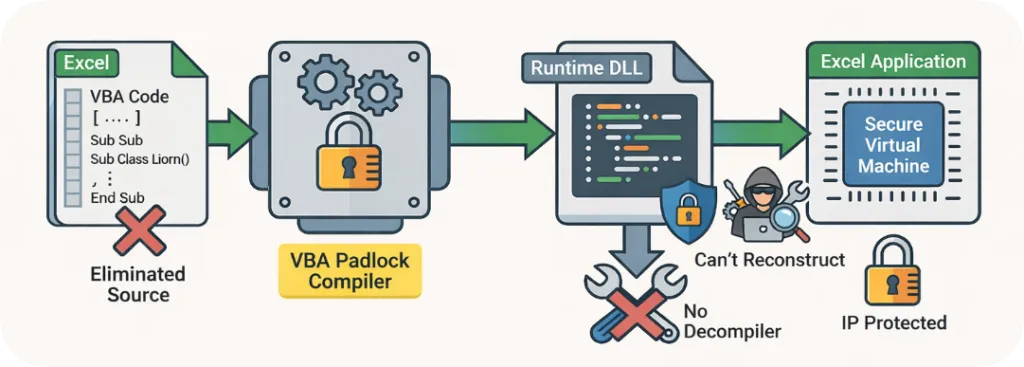
VBA Padlock converts source code into protected bytecode stored in signed DLLs.
VBA Padlock takes this approach. Instead of hiding your code behind a removable password or scrambling it with an obfuscator, it compiles your VBA macros into native 32-bit and 64-bit Windows DLLs. The original VBA is transformed into bytecode - a completely different binary format that cannot be decompiled back to readable source.
Your Office file (.xlsm, .docm, .accdb, .pptm) contains only a thin VBA Bridge module: a few lines of public code that load the DLL and route function calls. All your intellectual property lives inside the compiled DLL, invisible to anyone opening the VBA Editor.
Here’s what the caller code looks like - this is all that’s visible:
Sub RunMyCalculation() Dim Result As Variant Result = VBAPL_Execute("CalculateDiscount", 100, 0.15) MsgBox "Final price: $" & Format(Result, "0.00")End SubThe actual CalculateDiscount function - with all its logic - exists only inside the DLL.
What DLL Compilation Gives You
| Aspect | Password | Obfuscation | DLL Compilation |
|---|---|---|---|
| Source code in VBA Editor | Yes | Yes (garbled) | No - only the Bridge |
| Bypassable with free tools | Yes | No | No |
| Algorithm logic recoverable | Yes | Yes (with effort) | No |
| Built-in licensing support | No | No | Yes |
| Signed binary output | N/A | N/A | Yes (Authenticode) |
Beyond Protection: Built-in Licensing
Because VBA Padlock compiles your code into a DLL, it can embed licensing features directly into the binary:
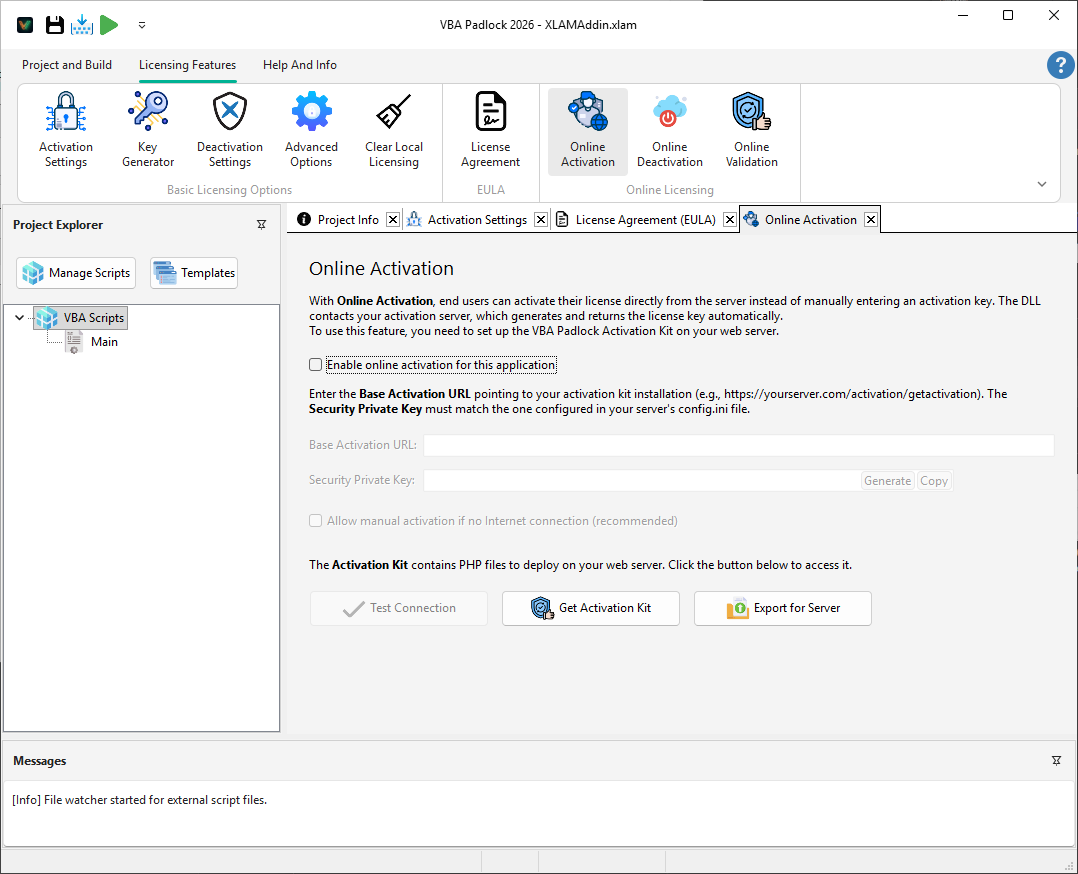
Licensing and online activation are configured in the compiled project, not in editable VBA modules.
- Hardware-locked activation keys that work only on a specific machine
- Trial periods with configurable nag screens
- Online activation with a ready-to-deploy PHP server kit
- License deactivation so users can transfer to a new computer
These features are compiled into the DLL itself - no extra VBA code needed in your Office file.
When Should You Use DLL Compilation?
If you distribute VBA macros to anyone outside your immediate team, and your code contains proprietary logic that you don’t want copied or modified, DLL compilation is the only approach that removes the source code entirely.
This applies to:
- Commercial add-ins sold to customers
- Financial models with proprietary calculation logic
- Consulting deliverables you build for clients
- Internal enterprise tools distributed across departments
If your macros are simple utilities with no competitive value, password protection may be sufficient. But if your VBA code is your product, a password is not enough.
Next Steps
- Understand the technical differences - read our detailed comparison of VBA password protection vs DLL compilation for a deeper technical breakdown
- See how compilation works - learn about the full VBA to DLL compilation pipeline and what the output looks like
- Try it yourself - download the free trial and compile your first VBA project in minutes